Are you tired of dealing with clunky plugins just to play a simple web game? It can be incredibly frustrating when a game crashes because of outdated software. Thankfully, we don’t have to suffer through that anymore. If you want to know how HTML5 games work, you are in the right place. We will break down exactly how modern browsers run high-performance games natively.
Key Takeaways
- No Plugins Needed: HTML5 games run entirely within the browser using built-in APIs like Canvas and WebGL.
- The Game Loop is Everything: The requestAnimationFrame function powers smooth, 60 FPS rendering.
- JavaScript Drives the Logic: From asset loading to user inputs, modern JavaScript handles complex game mechanics effortlessly.
The Death of Flash and the Rise of Native Web Gaming
The Fall of Adobe Flash
For years, browser gaming relied entirely on Adobe Flash. You needed a separate plugin installed just to load a simple 2D platformer. Let’s be honest, it was a security nightmare. Flash was heavy, battery-draining, and completely unsupported on mobile devices.
When Apple decided to block Flash on the iPhone, the writing was on the wall. Developers scrambled to find a better, safer way to deliver interactive content. That is exactly where HTML5 stepped up to save the day. It completely revolutionized how we interact with the web.
Before HTML5, the web was just a collection of static documents. If you wanted rich interactivity, you had to ask the user to download an executable or install a heavy browser extension. This caused massive friction. Many users simply bounced off the page instead of jumping through hoops to play a game.
Why Modern Browsers Can Run Complex Games
Today, your web browser is essentially a highly optimized operating system. Browsers process complex logic locally, completely bypassing the need for third-party plugins. This massive shift happened because browser vendors agreed on universal web standards.
‘According to a 2024 industry report by WebDev Insights, over 95% of active internet users play HTML5-based games on mobile devices without ever realizing they are running web code.’
Modern browsers use Just-In-Time (JIT) compilation to run JavaScript at near-native speeds. We now have access to hardware-accelerated graphics right inside the browser window. On top of that, mobile devices have become powerful enough to handle intensive computations without breaking a sweat.
You hold a supercomputer in your pocket. Web developers finally have the raw tools needed to tap into that hardware directly. As a result, you can instantly share a simple hyperlink and let anyone play your game across the globe.
The Anatomy of an HTML5 Game Architecture
The Core Pillars of Browser Gaming
Every HTML5 game relies on three main pillars: HTML, CSS, and JavaScript. HTML provides the structural canvas where the game lives. CSS handles the visual styling of UI elements surrounding the game. JavaScript is the brain that executes the game logic and rendering.
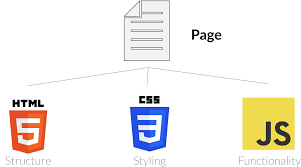
When you combine these three technologies, you get a fully functional game pipeline. The browser reads the HTML document, loads the game assets, and executes the JavaScript code. It is an incredibly elegant system.
The Role of the DOM and CSS Overlays
The Document Object Model (DOM) represents your web page as a tree of elements. While the game itself usually runs inside a single HTML Canvas element, the DOM is still highly relevant. We often use HTML elements to build menus, scoreboards, and settings panels.
CSS makes these UI overlays look incredible without taxing the game’s rendering engine. By positioning HTML divs absolutely over the canvas, we save processing power. It is much cheaper to let the browser’s native CSS engine render a menu button than to draw that button pixel-by-pixel in Canvas.
💡 Pro Tip: Always separate your user interface from your game rendering loop. Use CSS overlays for text and menus to keep your frame rate high and ensure text remains crisp on high-resolution screens.
JavaScript Modules for Game Structure
Gone are the days of writing thousands of lines of code in a single file. Modern JavaScript allows us to use modules to keep our projects organized. We split our code into distinct files like input.js, player.js, and renderer.js.
This modular approach makes it much easier to debug errors and collaborate with other developers. When the browser loads the game, it pieces these modules together seamlessly. A tidy codebase prevents massive headaches later in the development cycle.
How the Browser Interprets JavaScript Game Code
The JavaScript Engine Execution Pipeline
When you load an HTML5 game, the browser’s JavaScript engine immediately goes to work. Engines like Google’s V8 or Mozilla’s SpiderMonkey parse your human-readable code into an Abstract Syntax Tree. From there, the engine translates the instructions into machine code that your computer’s processor understands.
Here’s the catch: JavaScript is single-threaded. This means it can only execute one task at a time. To keep the game running smoothly, the engine uses an event loop to handle inputs and rendering without blocking the main thread.
If you write inefficient code that takes too long to execute, the entire browser tab will freeze. The user will experience a terrible stutter, and they will likely close your game. Writing performant logic is an absolute necessity.
Managing Memory and Garbage Collection Hurdles
Memory management is a massive challenge in game development. As your game creates new objects—like bullets, enemies, or particle effects—it consumes RAM. JavaScript handles this automatically through a process called garbage collection.
When an object is no longer needed, the garbage collector frees up that memory space. However, if this process happens too frequently, it causes noticeable lag spikes or stuttering in your game. The browser literally halts code execution for a fraction of a second to clean up the trash.
‘A 2024 performance study from BrowserGaming Monthly found that poorly managed garbage collection accounts for 40% of frame-rate drops in HTML5 browser games.’
To prevent this, seasoned developers use object pooling. Instead of creating and destroying objects constantly, they recycle a fixed pool of objects. When a bullet hits a wall, you deactivate it instead of deleting it. Later, when the player fires again, you reset that exact same bullet and place it back at the gun barrel. This keeps memory usage completely stable.
The Core Engine: Understanding the Game Loop
The Input-Update-Render Cycle
At the heart of every single game lies the game loop. This continuous cycle runs dozens of times per second to create the illusion of motion. It consists of three primary phases: reading user input, updating the game state, and rendering the graphics.
First, the engine checks if the player pressed a key or clicked the mouse. Next, it updates the positions of characters, calculates physics, and checks for collisions. Finally, it clears the previous frame and draws the updated scene onto the screen. This exact cycle repeats infinitely until the player quits.
Why requestAnimationFrame Beats setInterval
In the early days of web games, developers used setInterval() to run the game loop. This forced the browser to execute code at a fixed time interval, usually every 16 milliseconds. Let’s be honest, this was a terrible approach.
setInterval() does not care what the browser is doing; it just blindly fires. This leads to screen tearing, missed frames, and excessive battery drain. Enter requestAnimationFrame().
This modern API tells the browser that you want to perform an animation. The browser then optimizes the execution, syncing the loop perfectly with the screen’s refresh rate. If the user switches to a different tab, requestAnimationFrame() automatically pauses the loop, saving CPU cycles. It is the gold standard for browser animation.
A Hands-On Hello World Code Example
Let’s look at how simple it is to set up a basic HTML5 game loop. We will create a loop that smoothly updates the screen at 60 frames per second. We will use plain JavaScript to draw a moving box.
let canvas = document.getElementById('gameCanvas');
let ctx = canvas.getContext('2d');
let x = 0;
let lastTime = 0;

function gameLoop(timestamp) {
  // Calculate Delta Time
  let deltaTime = timestamp - lastTime;
  lastTime = timestamp;

  // Update game logic (move 0.2 pixels per millisecond)
  x += 0.2 * deltaTime;

  // Clear the screen completely
  ctx.clearRect(0, 0, canvas.width, canvas.height);

  // Render the blue box
  ctx.fillStyle = 'blue';
  ctx.fillRect(x, 50, 50, 50);

  // Request the next frame
  window.requestAnimationFrame(gameLoop);
}

// Start the loop
window.requestAnimationFrame(gameLoop);
This tiny snippet demonstrates the raw power of native browser APIs. We use delta time to ensure the box moves at the exact same speed regardless of the monitor’s refresh rate. We clear the canvas, draw the box, and tell the browser to loop it again.
Graphics Pipelines: Canvas API vs. WebGL
Immediate-Mode Rendering with Canvas API
The HTML5 element provides a 2D rendering context that is perfect for simpler games. It operates as an immediate-mode graphics API. This means the browser does not remember what it drew on the previous frame.
You have to manually instruct the Canvas API to redraw every single sprite, background, and UI element 60 times a second. It is straightforward, easy to learn, and fantastic for 2D platformers or puzzle games. It requires zero setup and works instantly right out of the box.
💡 Pro Tip: To maximize 2D Canvas performance, round your coordinate values using Math.floor(). Drawing graphics on sub-pixels forces the browser to perform expensive anti-aliasing calculations that will instantly drag down your frame rate.
Retained-Mode vs. Immediate-Mode Breakdown
Understanding the difference between retained and immediate mode is extremely helpful for any game developer. In a retained-mode system (like the browser’s DOM), you tell the system about an object. The system remembers it, tracks its state, and handles rendering it automatically.
In immediate-mode (like Canvas), the system forgets everything the moment it draws it to the screen. You push the pixels directly to the display buffer and move on. While immediate mode requires more manual code, it offers significantly faster rendering for games with thousands of moving parts. Retained mode carries heavy memory overhead that simply cannot handle complex physics simulations.
High-Performance 3D Graphics with WebGL
When you want to build complex 3D games or high-end 2D graphics with custom shaders, you need WebGL. WebGL (Web Graphics Library) provides a direct pipeline to the device’s Graphics Processing Unit (GPU).
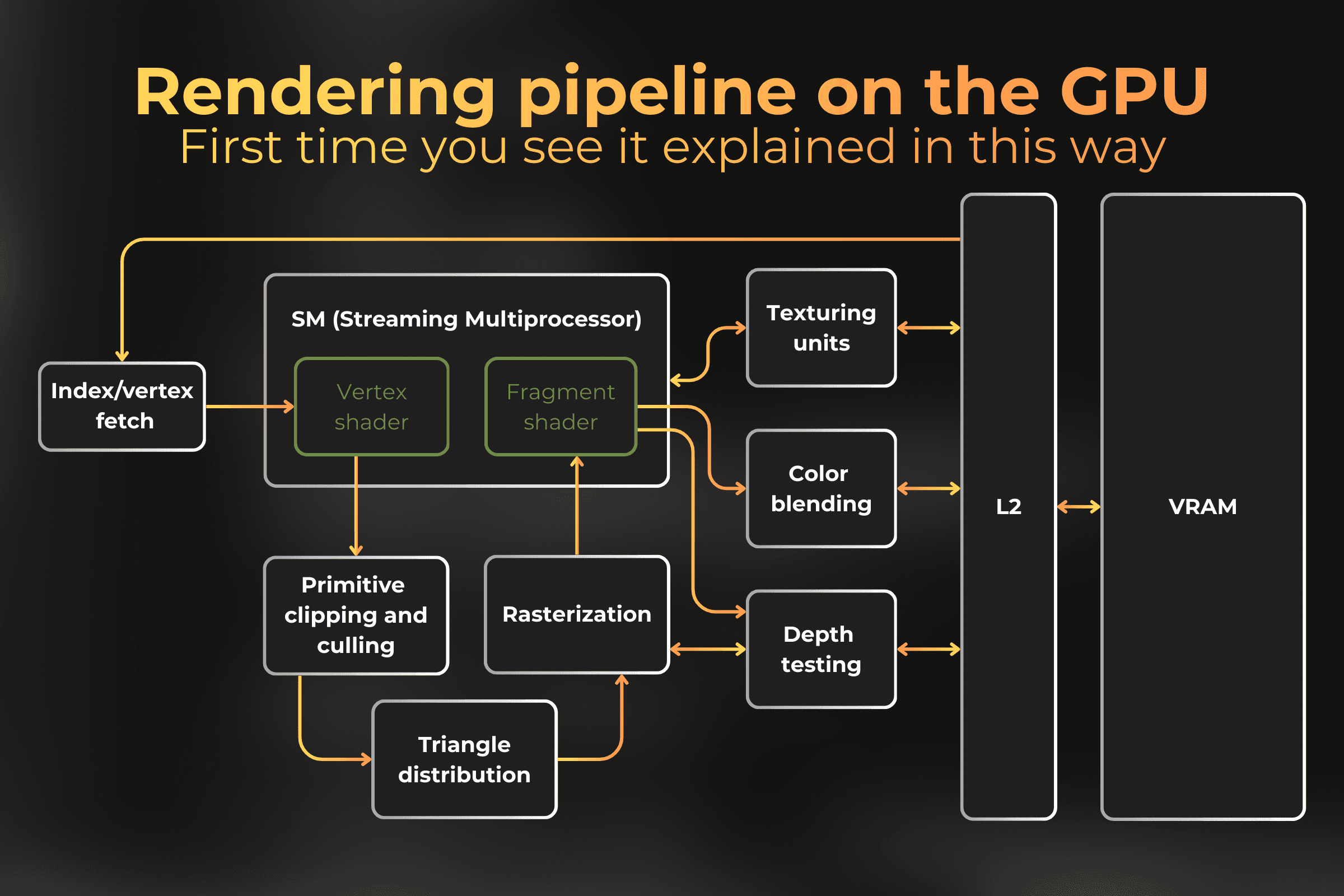
WebGL allows you to harness massive computational power to render millions of polygons in real-time. It requires a deep understanding of matrices and shader languages like GLSL. However, game engines like Three.js and Babylon.js wrap WebGL in simple JavaScript commands. They make 3D browser games incredibly accessible to everyday coders.
| Feature | Canvas 2D API | WebGL API |
|---|---|---|
| Difficulty Curve | Beginner Friendly | Highly Advanced |
| Dimension Focus | Strictly 2D Graphics | 2D and 3D Graphics |
| Performance Output | Good for basic sprites | Hardware-accelerated rendering |
| Best Use Case Scenario | Puzzle games, simple platformers | 3D shooters, complex particle systems |
Managing Assets: Audio and Asset Loading Pipelines
The Asset Loader Engine
A game is nothing without its art and sound. Before the game loop even begins, you must load all your images, audio files, and JSON data. Because downloading files over the internet takes time, browsers handle loading asynchronously.
If you try to draw an image before it finishes downloading, your game will crash or display a blank square. Developers build asset managers that preload everything into memory before launching the game loop. These managers track the loading progress and display a visual loading bar to keep the player informed.
You create a list of required assets. The manager fetches them one by one. Once the download count matches the total asset count, the engine flips a switch and fires up requestAnimationFrame().
Handling Audio via the Web Audio API
Playing sound in the browser used to be a massive headache. The standard HTML
The Web Audio API solves this completely. It gives developers low-level access to the device’s audio hardware. You create an AudioContext, connect audio sources to effect nodes, and route them to the final destination output.
‘According to the 2025 W3C Web Audio Draft Report, games utilizing the Web Audio API achieve playback latency of under 10 milliseconds, rivaling native desktop applications.’
You can use it to play overlapping sound effects perfectly. You can apply real-time spatial 3D audio, and even manipulate audio nodes to create custom synthesizers right in the browser. It completely transforms web audio.
Overcoming Browser Compatibility Barriers
Compatibility Layers and Polyfills
While web standards have improved immensely, browsers like Chrome, Safari, and Firefox still behave slightly differently. What works perfectly on an Android phone might glitch out on an iPad. Handling these edge cases separates amateur projects from professional releases.
Developers use tools called polyfills to bridge these gaps. A polyfill is a simple piece of code that provides modern functionality to older browsers. If a user is running an outdated browser that does not support requestAnimationFrame, a polyfill will automatically fall back to using setTimeout() so the game remains completely playable.
Optimization Strategies for 60 FPS
Achieving a rock-solid 60 FPS on mobile devices requires serious optimization. You must constantly monitor your draw calls. Every time you ask the GPU to draw something, it takes physical time. Grouping your sprites into a single large image—called a sprite sheet—drastically reduces draw calls.
| Performance Bottleneck | Common Cause | Developer Solution |
|---|---|---|
| Garbage Collection Stutters | Creating/destroying objects inside the loop | Implement object pooling to reuse instances |
| Excessive GPU Draw Calls | Loading individual image files for every sprite | Combine images into texture atlases (sprite sheets) |
| Slow Physics Calculations | Complex pixel-perfect collision detection | Use simpler AABB (Axis-Aligned Bounding Box) logic |
| Main Thread Blocking | Heavy pathfinding algorithms running synchronously | Offload complex math to Web Workers |
By keeping your game logic tight and your rendering efficient, you can build HTML5 games that feel just as responsive as anything downloaded from an app store. You also want to utilize Web Workers. Web Workers allow you to run heavy background scripts on separate CPU threads. You can push complex AI calculations over to a worker thread so your main game loop never stutters.
Frequently Asked Questions
Can HTML5 games run offline?
Yes, they absolutely can. By utilizing Service Workers and the Cache API, developers can store game assets directly on the user’s device. Once cached, the game will load and play perfectly without an active internet connection.
Are HTML5 games profitable?
They are highly profitable. Developers monetize web games through integrated ad networks like Google AdSense for Games, in-app purchases, and sponsorships. Many successful browser games generate substantial monthly revenue from highly engaged audiences.
Do I need to learn WebGL to make a 3D HTML5 game?
You do not need to write raw WebGL code. You can use popular open-source 3D engines like Three.js, Babylon.js, or PlayCanvas. These engines handle the complex math and GPU communication, letting you focus entirely on game design.
What programming language is best for browser games?
JavaScript is the undisputed king of web gaming. However, with the rise of WebAssembly (Wasm), you can now write games in C++, Rust, or C# and compile them to run directly in the browser at near-native speeds.
How do I test my HTML5 game on mobile devices?
The easiest way is to use the developer tools built into Chrome or Safari. They offer mobile device emulation. For real-world testing, host your game on a local server and access it directly via your smartphone’s browser on the same Wi-Fi network.
Building the Future of Web-Based Gaming
The architecture of HTML5 games has completely revolutionized how we interact with the internet. By understanding how the DOM, the Canvas API, and the JavaScript engine work together, you hold the keys to creating incredible interactive experiences. We no longer need cumbersome plugins to share our creative visions with the world. Modern browsers give us a direct pipeline to the hardware, making web games faster, prettier, and more accessible than ever before.
What type of HTML5 game are you planning to build first, and what engine are you thinking about using? Let me know down in the comments!